




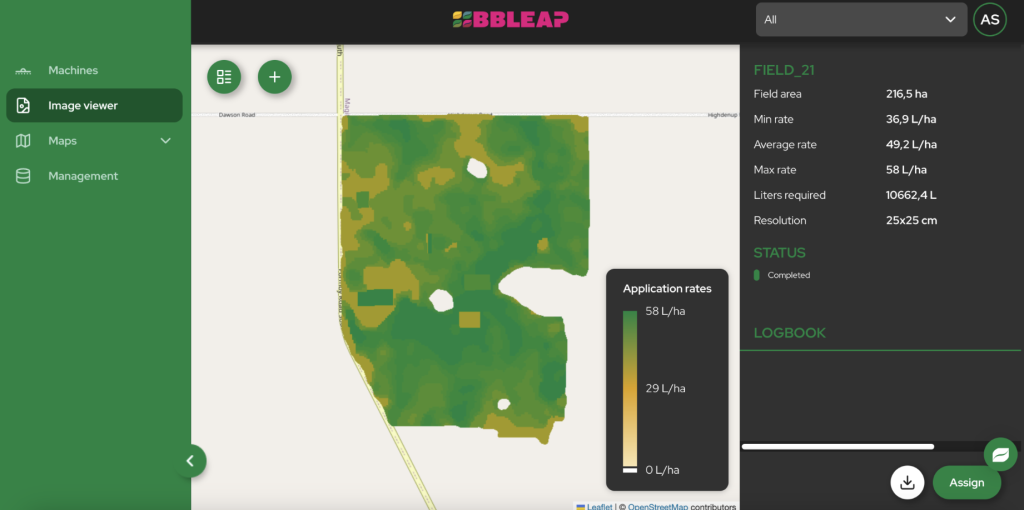
The end-to-end process for using prescription maps on a sprayer involves four main stages: collecting field data, creating the map, wirelessly transferring it to the sprayer, and executing the precision application in the field. Our system is designed to make this workflow seamless, moving you from whole-field treatment to plant-level precision without the hassle of manual data transfer. This approach ensures you apply exactly what’s needed, where it’s needed. Read the overview article about using prescription maps on a sprayer
What are the main steps for creating and applying a prescription map with your sprayer?
Creating and applying a prescription map involves a clear, sequential workflow: collecting field data, generating the map, uploading it to our LeapSpace platform, and executing the task in the field with your LeapBox-equipped sprayer. This process transforms raw field information into precise, automated spraying actions that optimize input use and improve crop health.
- Data Collection: The first step is to gather information about the variation within your field. This data can come from various sources, including drone imagery, satellite data, or soil sensor readings. We collaborate with expert data providers who can help you capture the right information to identify weed locations, nutrient deficiencies, or differences in crop biomass.
- Prescription Map Generation: Once you have the data, you or your crop advisor can use farm management software to translate it into a prescription map. This digital map divides the field into different zones, assigning a specific application rate to each. With our technology, you can create high-resolution maps that control application down to a 25 x 25 cm grid.
- Wireless Upload to LeapSpace: Instead of dealing with USB sticks, you can upload the finished prescription map directly to our LeapSpace cloud platform. This can be done from any computer with an internet connection, streamlining the data transfer between the office and the field.
- Automatic Sync to Sprayer: As soon as the map is in LeapSpace, it automatically syncs with the LeapBox system on your sprayer. When you get to the field, the task is already loaded and waiting on your terminal, ready for you to start.
- In-Field Execution: In the cab, simply select the correct task map, perform a final check, and begin spraying. Our system takes over, using GPS to track your position and automatically adjusting the rate nozzle-by-nozzle according to the map’s instructions.
How do you correctly import and set up a prescription map on your sprayer’s terminal?
To correctly import and set up a prescription map, you simply upload the file to our LeapSpace platform, which syncs it automatically to your sprayer’s terminal. In the cab, you then select the task, confirm the product and rate settings, and activate automated control to begin spraying with precision. This wireless process eliminates common errors associated with manual file transfers.
- Use Cloud-Based Transfer: The most reliable way to import a map is through our LeapSpace platform. Uploading the file online sends it directly to your machine’s terminal via a 4G connection. This method avoids potential compatibility issues or data corruption that can happen with USB sticks.
- Select the Correct Task in the Cab: Once you are in the field, navigate your sprayer’s terminal to the task menu. The prescription map you uploaded will be listed. Select the map corresponding to the field you are about to spray.
- Confirm Products and Rates: The terminal will display the rates defined in the prescription map. Your primary task is to confirm that the product mixture in your sprayer tank matches the product the map was created for. Our system reads the rate values from the map file, so no manual entry is needed.
- Activate Automatic Rate Control: To allow the map to control the sprayer, you must switch the system to automatic or task-control mode. This setting tells our LeapBox to follow the map’s instructions precisely, adjusting the output of each nozzle as you drive across the different zones in the field.
- Perform a Final Systems Check: Before you start spraying, do a quick final check. Ensure you have a strong GPS signal and that your sprayer’s position is accurately displayed on the map in the terminal. This guarantees that the application starts correctly and aligns perfectly with the field’s prescription zones.
How do you verify and document the application of a prescription map in the field?
You verify application in real-time by monitoring your sprayer’s terminal, which shows target versus actual application rates. For documentation, our LeapSpace platform automatically generates and securely stores a detailed ‘as-applied’ map after the job is finished, giving you a perfect record of the operation for analysis and compliance.
- Monitor the In-Cab Display in Real-Time: While spraying, your terminal provides live feedback. You can see your sprayer moving across the prescription map and watch as the target application rate changes when you enter a new zone. You can also monitor the actual applied rate to confirm the system is performing correctly.
- Check for System Alerts: Keep an eye on the terminal for any notifications or alerts. The system will warn you if there is an issue, such as a lost GPS signal, that could affect the accuracy of the application. This allows you to pause and resolve the problem immediately.
- Review the As-Applied Map Automatically: After you finish spraying a field, our system automatically creates and saves an as-applied map to your LeapSpace account. This map is your proof of performance, showing exactly what rate was applied at every point in the field.
- Analyze and Keep Records: Use the as-applied map in LeapSpace for documentation and future planning. You can compare the prescription map with the as-applied map to confirm accuracy, keep records for environmental compliance, and analyze the results to fine-tune your strategy for the next season.
- Troubleshoot if Necessary: If the sprayer doesn’t seem to be following the map, first check that automatic rate control is enabled and that the correct task is selected. If issues persist, our full connectivity allows for remote support. We can often diagnose and resolve software-related problems directly from our office, getting you back to work quickly.
Conclusion
Embracing prescription maps is a decisive step towards more intelligent, efficient, and sustainable farming. The process, from data collection to final documentation, is straightforward with the right technology. Our integrated solution, combining the LeapBox hardware with the LeapSpace cloud platform, simplifies every step. We eliminate manual data transfer, provide real-time control, and deliver automatic as-applied documentation. This allows you to focus on results: saving on chemical costs, improving your yield, and farming on the plant level.