




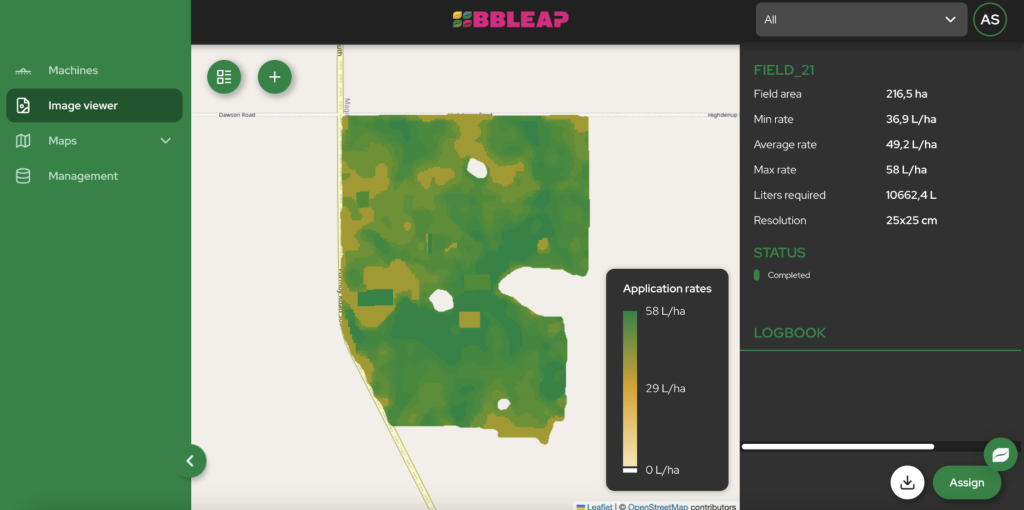
Arranging prescription map spraying involves four key roles: data creation, map transfer, on-machine execution, and agronomic decision-making. These can be managed by separate providers—such as an agronomist, a software platform, and a hardware supplier—or consolidated through an integrated partner. The key is coordinating these elements to work seamlessly with your existing sprayer.
Getting started with spraying from prescription maps allows you to plan location-specific treatments; actual input and crop results depend on the application and setup. But it requires coordinating a few different pieces of the puzzle. This guide breaks down who does what, the order of operations, and how to get your own machine ready for precision application.
Who Is Responsible for What in Prescription Spraying?
Successfully using prescription maps means ensuring four distinct roles are filled. Sometimes one company provides multiple services, but understanding each function helps you build the right setup for your operation.
| Role | What It Delivers | Who Typically Does It | What You Need From Them |
|---|---|---|---|
| Data & Map Creation | A digital prescription map file (e.g., Shapefile, ISO-XML) that tells the sprayer where to apply specific rates. | Drone service providers, satellite imagery companies, or your agronomist/crop advisor. | A map file compatible with your software platform, delivered at the resolution you need. |
| Map Transfer & Storage | A cloud-based platform to upload the map, send it to the sprayer’s terminal, and store the resulting “as-applied” data. | A farm management software (FMS) or a dedicated technology platform like BBLeap’s LeapSpace. | Wireless connectivity to the machine and secure storage for application records. |
| Execution on the Machine | The physical hardware on the sprayer that reads the map and controls the valves to vary the dose per nozzle or section. | The sprayer’s rate controller and nozzle hardware. BBLeap’s LeapBox uses variable-frequency and duty-cycle control and supports high-resolution taskmap execution within a compatible configured workflow. | The ability to execute the map’s instructions accurately at your target speed and pressure. |
| Driving & Agronomic Decisions | Operating the sprayer in the field and making the final agronomic decisions about rates, products, and timing. | The grower, farmer, or contractor. | A clear understanding of the goals for the variable rate application. |
What Are the Steps to Get Started?
Once you understand the roles, you can follow a logical sequence to get your sprayer ready for task map execution. Following these steps ensures you don’t invest in a service or product before confirming your machine is compatible.
- Check your sprayer’s capabilities: The very first step is to assess your current equipment. Can it already vary the application rate? Does the terminal accept task maps? We cover what to look for in the next section.
- Decide on the resolution you need: Do you need to vary the rate per section, per nozzle, or even on a grid smaller than a nozzle? This decision will guide your choice of both map source and on-sprayer hardware. High-resolution spot spraying, for instance, requires individual nozzle control.
- Choose a map source: You or your crop advisor may create a suitable map, or you can choose a data provider that delivers a compatible format. This could be based on satellite data for nitrogen application, drone imagery for weed detection, or soil scans for nutrient management.
- Confirm the configuration and quote: Before purchasing or installing a retrofit, discuss the complete map-to-machine workflow, compatibility, required components, installation arrangements and costs with the supplier.
- Set up the machine for map execution: Once the configuration and quote are agreed, arrange any required installation. High-resolution execution requires suitable nozzle control, hardware/software configuration and compatible maps; a generic PWM retrofit alone does not establish this capability.
- Run a test in the field: Start with a single field to test the full workflow. Upload a map, send it to the machine, perform the application, and ensure everything operates as expected.
- Check the as-applied data: After spraying, review the as-applied map in your software platform. This crucial step verifies that the sprayer applied the intended rates in the correct locations, closing the loop on your precision agriculture process.
What Should You Check on Your Sprayer First?
Before contacting any suppliers, a quick audit of your current sprayer will tell you what you need to upgrade. Your machine’s existing setup is the foundation for any prescription map system.
- Boom control (section or individual nozzle): Does your sprayer operate with boom sections (e.g., turning 3-metre sections on/off) or does it have individual nozzle control? Section on/off switching and variable-rate control are different capabilities. Check separately whether the controller can vary the application rate and execute maps; high-resolution applications also require suitably configured nozzle control.
- Terminal compatibility: Does your in-cab terminal accept external prescription maps (often called task maps or VRA maps)? Check the file formats it supports (e.g., ISO-XML, Shapefile) to ensure compatibility with map providers and software platforms.
- Performance in turns: When turning, the outer end of the boom travels much faster than the inner end. A system without appropriate turn compensation can apply too little on the outside or too much on the inside. Systems like BBLeap’s Curve Control adjust the rate per nozzle to correct for this speed difference automatically.
How Do You Arrange It with BBLeap?
If you’re looking to upgrade an existing sprayer for high-resolution task map spraying, BBLeap offers a streamlined path.
The LeapBox system is designed for retrofit use across sprayer brands. It uses variable-frequency and duty-cycle nozzle control at up to 100 Hz. High-resolution taskmap execution down to a 25×25 cm grid depends on the configured hardware/software workflow and compatible maps. The process typically starts with checking your machine’s compatibility. You can then get a specific quote for your setup using the online configurator.
For the data itself, BBLeap collaborates with a network of data provider partners who can generate high-resolution maps for broadacre crops and orchards. These maps are easily uploaded to the LeapSpace cloud platform and sent directly to the LeapBox on your sprayer.
To see the technology in action, ask BBLeap about available demonstration arrangements, including location, scheduling and any charges.
What Is the Timeline and What Can You Expect?
The time required to set up a sprayer for prescription mapping depends on the complexity of your machine and the specific hardware being installed. Before committing, confirm the installation arrangements and timing for your configuration. Also ask what training and support are included and how you can test the first taskmap workflow. These are matters to agree with the supplier, not a guaranteed completion date or an automatic training package.